

I love discovering new software that turn my digital photos into stunning images. I am not a "techie" person, and I always wanted to use easy, and simple software that will not require much knowledge.

CollageIt is a simple program that turn your images into beautiful collage. This is very easy to use in just few mouse click you'll see the result of your collage.
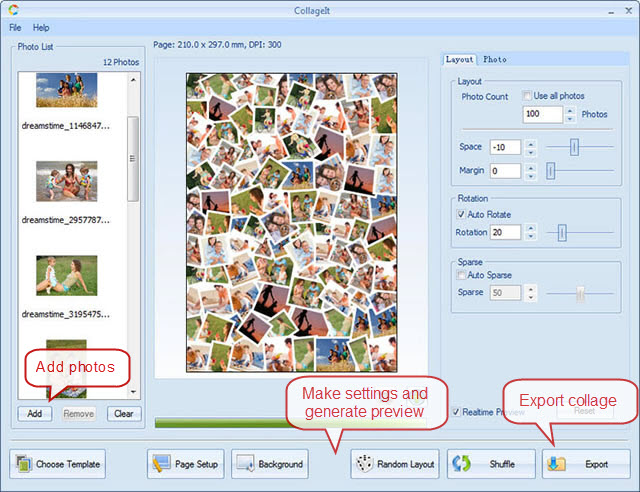
1. Open the CollageIt
2. Choose Template
3. Add your photos in the Photo List
4. Drag your photos to the template
5. Make a setting
Page Setup - lets you pick page size like A4, scrapbook, desktop wallpaper.
Background - lets you choose what will lie behind your collage.
Random Layout and Shuffle button - will show you the possible look of your photos in different ways.
Crop Button is located under the collage preview.
6. Export - which means you can SAVE your collage to images files such as BMP, JPEG, GIF, PNG, TGA etc.
 |
| Here is my simple and quick collage. |
CollageIt works on Windows 2000, XP, 2003, VISTA, Windows7 and MAC OS X 10.5 or later

On MAC it is the same procedure as the Windows but the only difference is the appearance of the program.
I received the product mentioned above. Regardless, I only recommend products or services I use personally and believe will be good for my readers.


No comments:
Post a Comment
Thanks for visiting